Showing posts with label photo editing company. Show all posts

Tuesday, 24 August 2021

How to Remove White Background Using Quick Selection Tool - Clipixie

 There are many ways to remove the white background in Photoshop. Experts editors in the best photo editing companies will be proficient and experienced in using various tools that allow you to select a desired portion of the image and erase or remove the rest. The process is relatively simple, but there are several steps you have to follow to get the best results.


  • You need to select the object using tools available in Photoshop like Pen tool, Lasso tool, Magic Wand Tool, and then reverse the selection to choose the rest of the image and delete it. 

  • Some tools allow you to select an object without manually tracing its outline, like Object Selection tools and Quick Selection tools.

  • Then you can use the Eraser tool to erase the background directly.


Quick Selection Tool


Comprehensive photo editing services include background removal, where they may use various methods and tools, some even in combination, to get the best results. The Quick Selection tool is similar to the Magic Wand tool- it also selects pixels based on tone and color. But this tool goes far beyond the Magic Wand’s limited capabilities and looks for similar textures in the image, allowing accurate detection of the edges of objects. Unlike the Magic Wand, the Quick Selection Tool works more like a brush, allowing you to select areas by dragging your mouse over them.


How to Use a Quick Selection Tool?


The quick selection tool is one of the best tools to remove a backdrop. Using this tool, you separate the subject from the background, making it easier to erase it.


Step 1: Open your image in Photoshop. You can do this by selecting the image from the folder after clicking File>Open.


Step 2: Unlock the original layer and create a duplicate layer to work with so you don’t lose the original image if you make a mistake. 


Step 3: Then, from the toolbar, activate the Quick Selection tool. Make sure the Add to Selection option is chosen. Drag it on the background to select it, and you will see a dotted line highlighting the selected portion.


Step 4: Now that the selection is made, you can use a layer mask to erase the background. A layer mask will allow you to go back and deselect any portion that you did not mean to erase. This way, you can make some parts visible again in case any mistakes were made. 


To create a layer mask, click the second button at the bottom of the layer panel while the selection is still active. Now you get a clean, transparent background instead of a plain white one. You can also reverse the selection, erase the subject and keep the background by pressing Ctrl/Cmd + I to inverse the layer mask results. If the images have reflective objects or vague outlines, then it may be best to pass them on to a photo editing agency where their experts can take care of them.


  • Quick Selection works on color sampling, so if, let’s say, the clothing worn by the subject has hints of white at the edges due to lighting or any other factor, then it also might get selected. You can fix this by holding the ALT key or choosing Subtract from Selection on the options bar and drag over the desired area to minus that portion. 


  • If you made a mistake at any point, you can select the mask layer and paint over the area using a white brush which you would like to make visible again. This gives you a better result, and you can use the mask anytime to clean up unwanted edges or parts.


Now that you have learnt about the quickest method to remove white background, you can start editing your images. If the image is more complicated and cannot be easily isolated from the background, you can contact us for professional image editing services.

Wednesday, 30 June 2021

7 Basic Tips for Professional Photo Retouching Services - Clipixie India

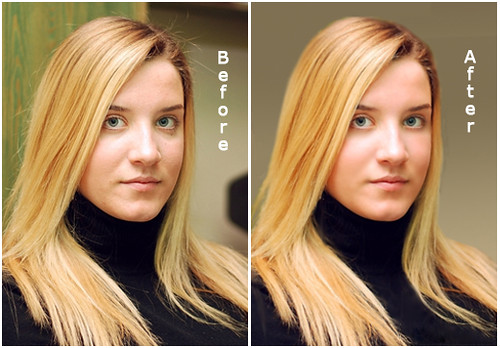
Photography doesn't just start and end with taking a picture. Even though it takes a lot of effort to capture the right image, photo editing plays a huge role in creating the perfect final result, which is why you should collaborate with the best photo editing agency


Editing is where you alter the picture, manipulate the features, focus on the subject and highlight certain aspects you want to emphasise. Let's take a peek at some of the tips for editing your photos.

Photo & Image Editing Services India


  1. Capture Interesting Lighting


Proper lighting is perhaps the most important factor in photography. A professional photographer will obsess about the lighting and often carry one of their own as part of their equipment. Using a broad source of light will soften its illumination on the subject. Also, the shadows created can be manipulated to give a three-dimensional look.


  1. Remove Aberrations


If the focus on an image is disturbed by any irrelevant objects, remove them out of the frame, or you can send them to a photo editing company to erase them without a trace. The clone stamp tool in Photoshop lets you copy pixels from one part of the image to another. This way, you can remove unwanted objects in the background.


  1. Focus on Subject


You don't have to be an expert in photography to know that some subjects are more interesting than others. But remember, an interesting subject does not make an interesting photo. While the subject is the main focus, it's not all that makes up an image. 


  1. Unique Perspective


A unique perspective can highlight your subject when you capture an image. Playing with different angles can create a result that draws a person's eye and evokes emotion. Changing the normal perspective in your photography can take your captured results to a whole new level. There are five types of perspective in photography:


  • Linear Perspective

  • Diminishing Scale Perspective

  • Forced Perspective

  • Aerial Perspective

  • Overlap


  1. Depth of Field


Beginners can control the depth of field by changing the aperture. A wider aperture can produce a shallower depth of field and vice versa. The photo's subject is sharp in a shallow depth of field, and the background is blurry. To capture sharpness, you should use a narrow aperture. 


  1. Mood 


Setting the right tone for the photo will assist you in conveying emotion. Like any work of art, emotion is a part of photography. Every picture tells a story, and the mood it displays exerts an emphasis on the emotion. Changing certain aspects of the photo can make a difference in the mood set. If you think this is too much work, outsource image editing services from a professional agency. They will establish a mood that aligns with the emotion you want to evoke from the viewer.


  1. Exposure


The overall darkness or lightness in a photo is known as exposure. The more exposure your camera gets, the lighter your photo will be. The features that control exposure are:


  • Shutter speed: It is the amount of time your camera takes to click a picture. The maximum duration in most cameras is 30 seconds. Some cameras have time modes to capture even longer.

  • Aperture: The function of aperture is similar to that of a human pupil. It can open and shrink to control the amount of light let through the lens. 

  • ISO: It's not a part of luminous exposure, and it does not affect the amount of light that reaches the camera's sensor. The brightening effect happens in-camera after the sensor has been exposed to the light.


You don't have to worry about changing all the features available in the software every time you edit a picture. The fundamental principle of good editing is that you don't take away any qualities from the image, only highlight or add to existing ones. An expert editor will know this and more.


Do you need to get photos retouched immediately? You can send professional or amateur photos to Clipixie, where our team of experts can provide the best photo editing services tailored to your specific needs.

Find Out Why Photo Retouching Services Are On A Rise Among Organisations Around The World

  Every business that you see today has an online presence. A good brand presence is essential for any business to survive in the long run. ...